
































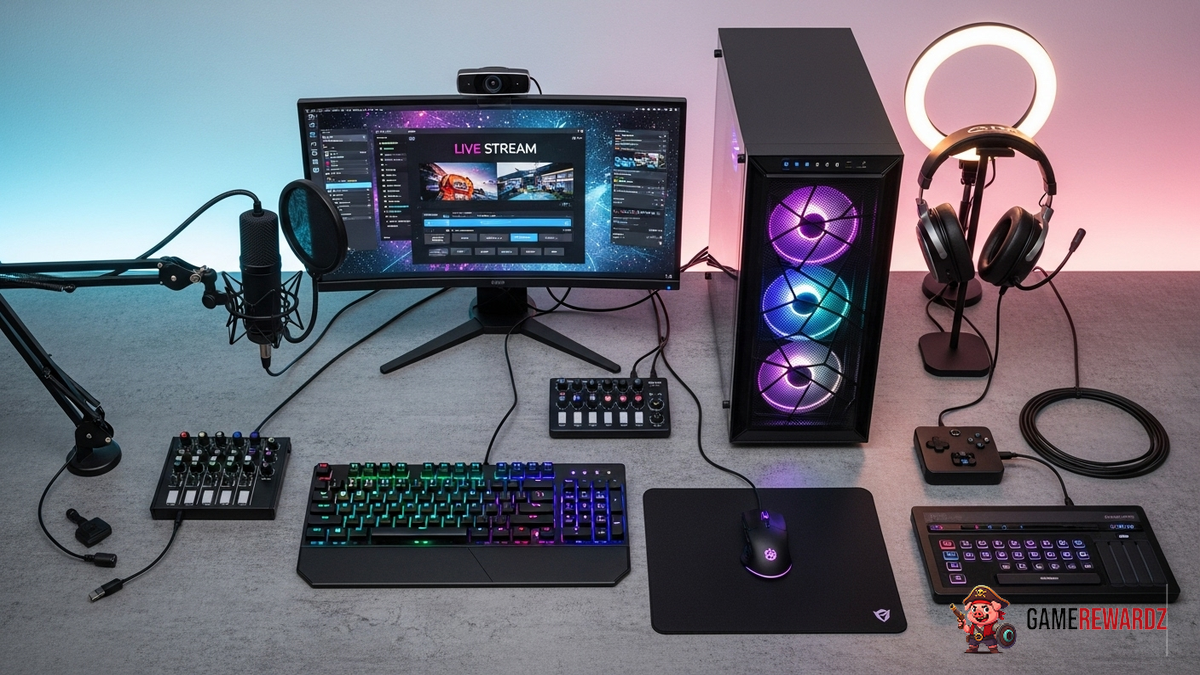
So, you wanna be a streamer, huh? Welcome to the club! It's a wild, wonderful, and occasionally frustrating world. I've been elbow-deep in streaming tech for years now, and let me tell you, the gear makes all the difference. But where do you even start?
Forget those generic “top 10” lists. This is about finding what actually works, what gives you that professional edge without breaking the bank. Because let's be real, streaming equipment can get expensive fast.
I remember when I first started, I thought, "Oh, I can just use my laptop's built-in camera and mic." Big mistake! I sounded like I was broadcasting from inside a tin can, and the video quality? Let’s just say it wasn’t pretty. So, learn from my mistakes, okay?
Essential Gear: Level Up Your Stream
Okay, so let's break down the core components you'll need to seriously consider to be on your way to the list of popular adventure games streamers.
- Camera: This is your face to the world. Don't skimp! Aim for at least 1080p resolution.
- Microphone: Crystal-clear audio is non-negotiable. A good USB microphone is a fantastic starting point.
- Lighting: You'd be surprised what a difference good lighting makes. A simple ring light can work wonders.
- Streaming Software: OBS Studio is the go-to choice for most streamers, and the best part? It's free!
But wait, there's more! Beyond the basics, there are a few other pieces of equipment that can dramatically improve your stream. Let's dive in...
Beyond the Basics: Streaming Accessories Worth Investing In
Now, let's get into some gear that will help you stand out from the crowd.
- Capture Card: If you're planning on streaming console games, a capture card is a must. It allows you to record and stream your gameplay footage without putting too much strain on your computer.
- Stream Deck: This little device is a game-changer for controlling your stream. You can use it to switch scenes, trigger sound effects, and much more, all with the press of a button.
- Green Screen: Want to get fancy with your backgrounds? A green screen allows you to overlay yourself onto any image or video you want.
I know, it sounds like a lot! And trust me, it can be. That's why it's important to prioritize the essentials first. Don't feel like you need to buy everything all at once. Start with a good camera and microphone, then gradually add more equipment as you go.
I initially thought that just having great gameplay was enough, but the visual quality does matter a lot! Here are some pro tricks that make your stream better, beyond just the equipment!
Microphone Magic: How to Sound Like a Pro
Okay, so you've got a decent microphone. Great! But just plugging it in isn't enough. You need to tweak your audio settings to get the best possible sound.
Here's a trick I learned the hard way: invest in a pop filter. It's a small mesh screen that sits in front of your microphone and helps to reduce those harsh "p" and "b" sounds that can ruin your audio. Trust me, your viewers will thank you.
Also, pay attention to your room acoustics. If you're streaming in a small, echoey room, your audio will sound terrible. Try to add some sound-dampening materials, like curtains or acoustic panels. Actually, that's not quite right. You don't need to go overboard (unless you want to!). Even strategically placed blankets can make a difference.
And for goodness' sake, learn to use noise cancellation! Many microphones and streaming software programs have built-in noise cancellation features. Use them! They can help to eliminate background noise like keyboard clicks, fan noise, and barking dogs (we've all been there, right?).
FAQ: Your Burning Streaming Questions Answered
How do I know if my internet speed is fast enough for streaming?
This is a big one! You need a stable internet connection with sufficient upload speed. As a rule of thumb, you'll want at least 5 Mbps upload speed for streaming in 720p at 30fps. For 1080p at 60fps, aim for 10 Mbps or higher. Run a speed test to check your upload speed. And remember, Wi-Fi can be unreliable. If possible, use a wired Ethernet connection for the most stable stream.
What's the deal with bitrates? Why does everyone talk about them?
Bitrate refers to the amount of data used per second to transmit your video and audio. A higher bitrate generally means better quality, but it also requires more bandwidth. Streaming platforms like Twitch have recommended bitrates for different resolutions and frame rates. It's crucial to find the right balance between quality and stability. If your bitrate is too high for your internet connection, you'll experience buffering and lag. Finding the sweet spot takes some experimentation. This also ties in to using the best streaming equipment for gamers.
Is a fancy webcam really worth the investment?
Honestly? Yes, within reason. While you don't need to drop thousands on a professional-grade camera, a dedicated webcam will almost always look better than your built-in laptop camera. The improved image quality and customization options are worth the investment. Think about it this way: your webcam is your face to the world. You want to make a good impression!
Why does my stream sometimes look pixelated, even with good equipment?
Pixelation can be caused by several factors. It could be due to a low bitrate (see above), but it can also be caused by network congestion or issues with the streaming platform itself. Sometimes, there's not much you can do about it. But try experimenting with different encoding settings in your streaming software. Encoding is the process of converting your video and audio into a format that can be streamed online. Different encoders have different performance characteristics. x264 is a popular software encoder, while NVENC is a hardware encoder that utilizes your graphics card. The best encoder for you will depend on your hardware and the game you're streaming. Check out this cool Apex Legends content to see how the pros do it!
How do I make my stream stand out from the crowd?
Good question! Having great equipment is important, but it's only one piece of the puzzle. The most important thing is to be yourself. Be authentic, be engaging, and be consistent. Find a niche that you're passionate about and build a community around it. Interact with your viewers, listen to their feedback, and have fun! Streaming is a marathon, not a sprint. Don't get discouraged if you don't see results overnight. Just keep learning, keep improving, and keep having fun.
So, there you have it. My thoughts on the best streaming equipment for gamers. Remember, it's not about having the most expensive gear. It's about using the right gear to create a high-quality, engaging stream that your viewers will love. Now get out there and start streaming!














![Peggle [FLASH] Game](https://gamerewardz.com/thumbs/peggle-flash-game_2.webp)








