
































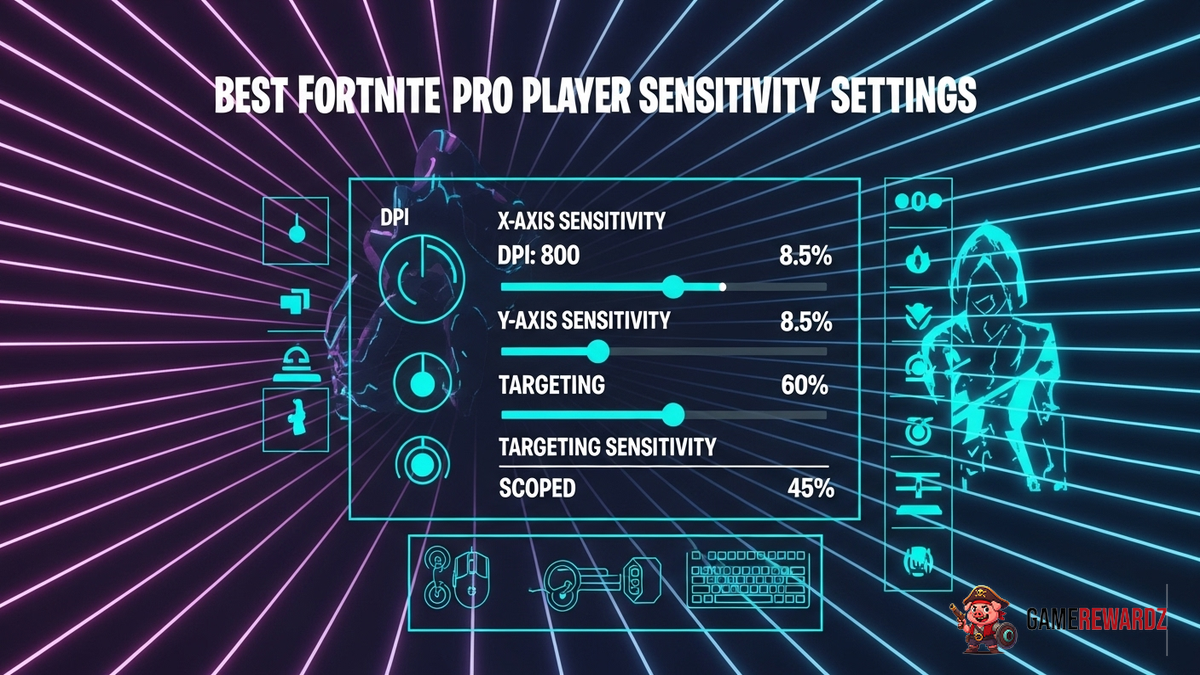
Finding YOUR Perfect Fortnite Sensitivity: More Art Than Science, Right?
Okay, let's be real. You're here because you want to snipe like a god, build like a ninja, and, well, generally dominate in Fortnite. And you've heard whispers about the mythical "best Fortnite pro player sensitivity settings." The thing is, there's no magic bullet. No one-size-fits-all. Anyone who tells you differently is probably trying to sell you something (or, you know, just doesn't know what they're talking about).
But! Don't despair. This is where things get interesting. We're going to dive into the nuances of sensitivity, explore the approaches used by some top players, and help you craft a sensitivity that actually works for you. Think of it as a journey of self-discovery, but with more Victory Royales along the way. Sounds good? Great!
I remember back in the day, messing around in creative mode, trying to mimick pro players but failing miserably. My builds were like wobbly towers of Jenga, and my aim? Let's just say I was better at hitting the broad side of a barn...from inside the barn. But I kept tweaking, kept experimenting, and eventually, I found something that clicked. And that's what I want to help you do.
Breaking Down the Basics: DPI, eDPI, and All That Jazz
Alright, before we get bogged down in specific numbers, let's cover some ground rules. You might be wondering about DPI and eDPI. DPI (dots per inch) is a measure of your mouse's sensitivity. Higher DPI means more sensitivity, right? Yes, but it's only half the story.
eDPI (effective dots per inch) is where things get real. It's DPI multiplied by your in-game sensitivity. This is the number that truly reflects how sensitive your aiming feels in Fortnite. Why does this matter? Because a player with 800 DPI and an in-game sensitivity of 0.10 will have the same eDPI as someone with 400 DPI and a sensitivity of 0.20. They'll both move their crosshairs the same distance with the same physical mouse movement.
I’ve got to admit, this part fascinates me. It's like the secret sauce behind aim consistency. So pay close attention here.
The frustrating thing about this topic is – there’s no golden rule to it. It really does all come down to personal preference and what just feels right to you! Find fun games to help you refine your Fortnite skills!
Examining Pro Settings: Inspiration, Not Imitation
Now, let's talk about the pros. Ninja, Tfue, Bugha – these are the names that often come up. And yes, looking at their settings can be a good starting point. Many resources online detail the specific sensitivity settings favored by popular Fortnite professionals. You can see examples of these settings right here.
But here's the critical thing: don't just blindly copy their settings. What works for them might not work for you. They have years of experience, different mouse pads, different mice, different desk setups, and different hand sizes. All of these factors influence what feels comfortable and accurate. Instead, use their settings as a source of inspiration. Try them out. See what you like and what you don't. And then, adjust accordingly.
For example, some pros prefer low sensitivity for greater precision, especially when aiming with sniper rifles. This allows for fine-grained movements and more consistent headshots. Others prefer higher sensitivity for faster building and quicker reactions in close-quarters combat. It's a trade-off between precision and speed, and finding the right balance is key.
Finding Your Fortnite Sensitivity Sweet Spot
Here’s the thing: the only way you're really going to work out which settings are ideal for you is to test them out. But how do you approach this? Here are some tips that I have found useful over time:
- Start with a baseline: Begin with a common eDPI range, like 40-80. This is a comfortable range for many players.
- Warm up: Before making any changes, play a few rounds to get a feel for your current settings.
- Adjust incrementally: Make small adjustments to your sensitivity, one at a time. Changing too many settings at once can make it difficult to pinpoint what's working and what's not.
- Test in different scenarios: Practice aiming at different ranges, building structures quickly, and tracking moving targets.
- Record your results: Keep track of your settings and how they feel. This will help you identify patterns and make more informed decisions.
And hey, don't be afraid to experiment! Finding the right sensitivity is a process of trial and error. It might take some time, but the effort will be worth it in the long run. Think of it like finding the perfect pair of shoes. You might try on a few different pairs before you find the ones that fit just right. Also, feel free to view this valuable article about starting an esports career for more insight.
FAQs: Sensitivity Settings
How do I know if my Fortnite sensitivity is too high?
If you consistently overshoot your targets, struggle to make small adjustments, or find it difficult to control recoil, your sensitivity might be too high. Try lowering it incrementally until you feel more in control. A good test is to focus on a distant object and slowly move your crosshair towards it. If you find yourself constantly overcorrecting, your sensitivity is likely too high.
Why do pro players use such different sensitivity settings?
Pro players have different playstyles, hardware setups, and personal preferences. Some prefer lower sensitivity for greater precision, while others prefer higher sensitivity for faster reactions. There's no one "right" way to do it. It's all about finding what works best for you.
Is it better to have a high or low eDPI in Fortnite?
There's no definitive answer, but most players find that an eDPI between 40 and 80 provides a good balance between precision and speed. Ultimately, it comes down to personal preference. Experiment with different eDPI ranges to see what feels most comfortable and accurate for you.
How often should I change my sensitivity settings?
Avoid changing your sensitivity settings too frequently. It takes time to develop muscle memory and adapt to new settings. If you're constantly tweaking your sensitivity, you'll never truly get comfortable with it. Only make changes when you feel it's necessary, and give yourself time to adjust before making further adjustments.
Finding your ideal Fortnite sensitivity is a journey, not a destination. Be patient, persistent, and willing to experiment. And most importantly, have fun! After all, that's what gaming is all about, right?














![Peggle [FLASH] Game](https://gamerewardz.com/thumbs/peggle-flash-game_2.webp)








