
































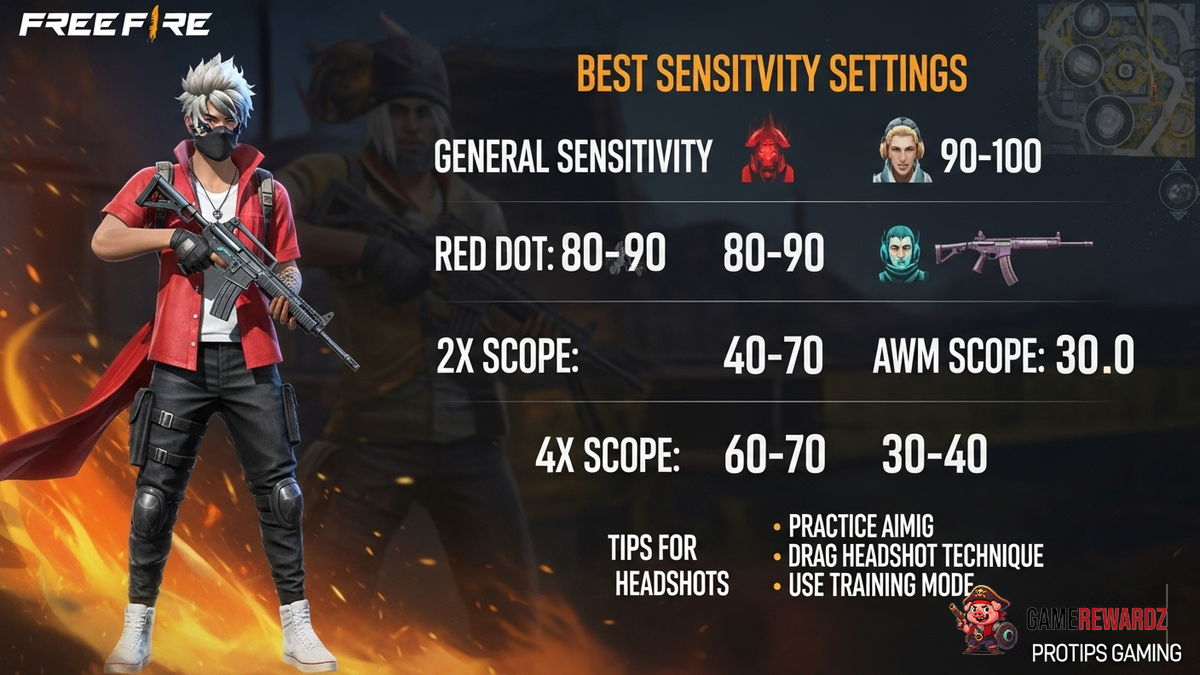
Okay, let's talk headshots in Free Fire. I know, I know, another guide promising to turn you into a headshot machine. But hear me out. This isn't just about copying some pro's settings. It’s about understanding why those settings work, and, more importantly, how to tweak them for your playstyle. Because let's be honest, what works for one player might feel totally clunky for another. Ever felt like your crosshair is glued to the enemy's chest no matter what you do? Yeah, been there.
So, forget the one-size-fits-all approach. We're diving deep into the sensitivity settings in Free Fire, figuring out how they affect your aim, and giving you the tools to find your perfect headshot recipe. It's gonna be a journey, but trust me, the payoff is worth it. Imagine consistently landing those sweet, satisfying headshots… the kind that make your opponents rage quit. evil laugh
Decoding the Sensitivity Puzzle
The frustrating thing about sensitivity settings is that there are so many of them! General, Red Dot, 2x Scope, 4x Scope, AWM Scope... it's enough to make your head spin. But here’s the thing: they all control how quickly your crosshair moves when you swipe your screen. Seems simple, right? Actually, it’s not quite that simple. Your device matters too – a phone and a tablet respond very differently!
Think of it like this: General sensitivity is the overall speed. It's the foundation upon which everything else is built. Red Dot and Scope sensitivities are multipliers on top of that foundation. Want a slower, more controlled aim with a scope? Lower the scope sensitivity. Want to flick to targets faster with your Red Dot? Crank it up! And if you want to claim your free elite pass in Free Fire, this article can help.
And here's a little secret I've learned after countless hours of tweaking: finding the right sensitivity is about more than just speed. It’s about consistency. You want to be able to reliably repeat your aiming motions. If your sensitivity is too high, you'll overshoot your targets. Too low, and you'll be playing catch-up. Finding that sweet spot where you can consistently track your enemies is the key.
Finding Your Perfect Free Fire Sensitivity Settings for Headshots
Okay, enough theory. Let's get practical. Here’s my recommended approach to finding your perfect sensitivity:
- Start with General: This is your baseline. I recommend starting around 50-60. Head into the training grounds and practice moving your crosshair smoothly from target to target. Adjust up or down until it feels comfortable.
- Tweak the Red Dot: The Red Dot is your close-quarters king. You want to be able to quickly snap to targets. I usually keep this a bit higher than my General, around 70-80.
- Scope Sensitivities: This is where things get personal. If you're a sniper, you'll want lower sensitivities for more precise aiming. If you prefer to use scopes for mid-range engagements, you might want them a bit higher. Experiment to find what works for you.
- The AWM Scope: This one is special. The AWM is a beast, and you want to make every shot count. I usually keep this very low, around 20-30, for maximum stability.
But, and this is a big but, don't just copy these numbers blindly! Use them as a starting point. The key is to experiment and practice. Spend time in the training grounds. Use different weapons. Play different game modes. The more you play, the more you'll develop a feel for what works best for you. You might be wondering why I'm stressing practice so much, right? Well, it's because muscle memory is a huge part of aiming. The more you practice with a consistent sensitivity, the more automatic your aiming will become.
Also, remember that device plays a major role. If you're on a smaller screen, you might need higher sensitivities to compensate for the limited screen space. If you're on a tablet, you might want lower sensitivities for more precise control. Consider your screen size, grip style, and personal preferences and if you are looking for more positioning tip, check out these Apex Legends tips that can also be helpful for Free Fire gameplay.
Beyond the Settings: Mastering the Fundamentals
Let me be clear: perfect sensitivity settings won't magically turn you into a pro. You also need to master the fundamentals of aiming. That means:
- Crosshair Placement: Always keep your crosshair at head level. This way, you're already halfway to a headshot.
- Movement: Don't stand still! Strafe, jump, and slide to make yourself a harder target.
- Recoil Control: Learn the recoil patterns of different weapons and compensate accordingly.
- Patience: Don't just spray and pray. Take your time, line up your shot, and make it count.
I initially thought that sensitivity was everything, but after playing for a while, I realized these basics can have a bigger impact than specific settings! So, while you're tweaking your sensitivities, don't neglect these fundamentals. They're the foundation of good aiming, regardless of your settings.
Fine-Tuning for Different Playstyles
Are you an aggressive rusher, or a cautious sniper? Your playstyle should influence your sensitivity settings. Rushers typically benefit from higher sensitivities, allowing them to quickly react to enemies in close quarters. Snipers, on the other hand, usually prefer lower sensitivities for greater precision at long range.
Here's the thing: if you are rushing, try focusing on hip-fire accuracy, and if you're sniping, take advantage of cover and minimize movement while aiming. But it all boils down to this: don't be afraid to experiment. Try different sensitivities and playstyles until you find a combination that feels natural and effective.
FAQ: Your Free Fire Sensitivity Questions Answered
Why do my sensitivity settings feel different on different devices?
This is a common issue. Different devices have different screen sizes, resolutions, and touch sensitivities. This means that the same sensitivity settings can feel very different on different devices. The best way to address this is to calibrate your settings individually for each device. Unfortunately. It can be a headache, but is necessary if you switch devices often.
How do I know if my sensitivity is too high or too low?
Good question! If you're constantly overshooting your targets, your sensitivity is probably too high. If you're struggling to keep up with enemies, it's probably too low. The ideal sensitivity allows you to smoothly track enemies without overcorrecting. A good way to test this is to aim at a stationary target and try to keep your crosshair on it while moving. If you find yourself constantly adjusting, your sensitivity needs tweaking. Also, keep in mind the kind of match you are playing, as this can affect things too. Learn more about the different games available with Crazy Games.
What's the best way to practice my aim in Free Fire?
The training grounds are your best friend. Spend time practicing with different weapons and sensitivities. Focus on smooth, controlled movements. Also, play regular matches and pay attention to your performance. Are you consistently missing shots? Are you overshooting or undershooting your targets? Use this feedback to adjust your settings and practice habits.
Should I copy pro players' sensitivity settings?
While it can be tempting to copy pro players' settings, it's important to remember that what works for them might not work for you. Pro players often have years of experience and highly specialized playstyles. Their settings are tailored to their specific needs and preferences. It's better to use their settings as a starting point and then adjust them to fit your own playstyle and device.
So, there you have it. My take on finding the best Free Fire sensitivity settings for headshots. Remember, it's a journey, not a destination. Be patient, experiment, and most importantly, have fun! Now go out there and land some headshots!














![Peggle [FLASH] Game](https://gamerewardz.com/thumbs/peggle-flash-game_2.webp)








