
































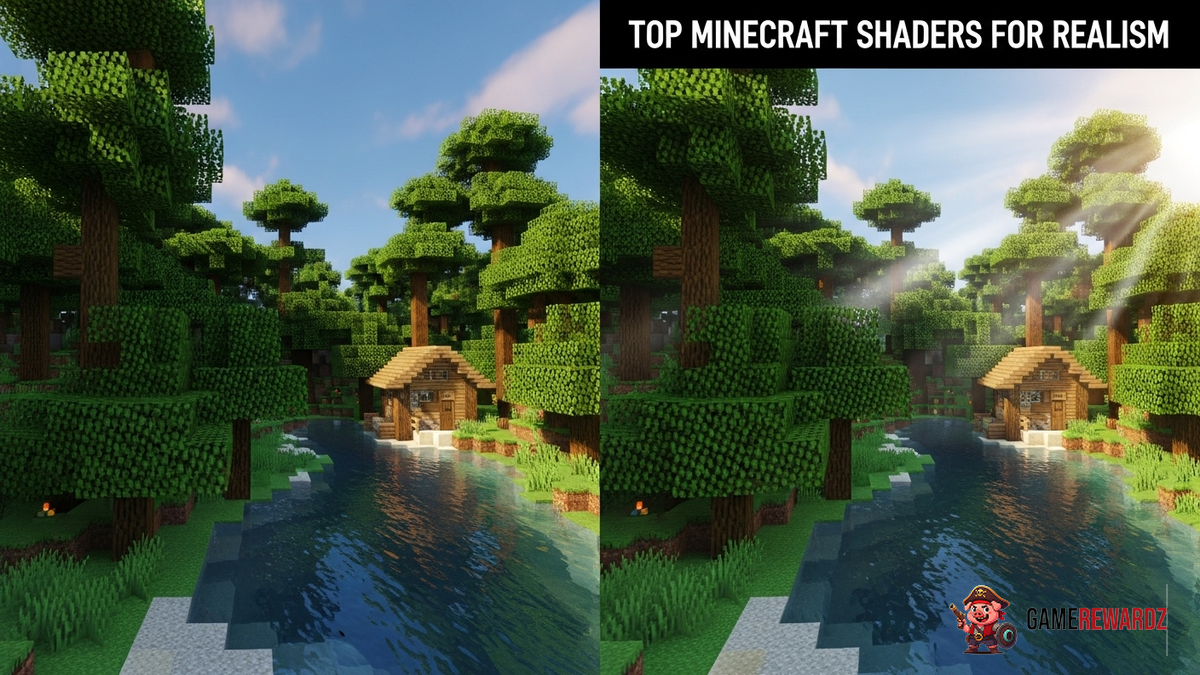
Okay, let's talk about Minecraft. Not just any Minecraft, but realistic Minecraft. And how do we achieve that? Shaders, my friend. Glorious, game-changing shaders. You might be thinking, "Minecraft is blocky! Realism? Blasphemy!" But hear me out. I’ve been messing around with Minecraft since beta (yes, I’m that old), and I’ve seen it evolve from charmingly retro to something genuinely breathtaking – all thanks to the power of shaders.
It’s like giving your favorite childhood toy a hyper-realistic makeover. Remember that teddy bear? Imagine it suddenly having fur that moves in the breeze (okay, maybe not that realistic). That’s kind of what shaders do for Minecraft. They transform the lighting, the water, the textures...everything.
Why Bother With Realistic Minecraft Shaders?
Honestly? Because it's awesome. It’s about taking something familiar and experiencing it in a completely new way. I remember the first time I saw the sun glinting off a shader-enhanced lake in Minecraft. It was like…whoa. That blocky world I knew so well suddenly felt alive, dynamic, and almost...peaceful? Yeah, Minecraft and peaceful, I know. Sometimes all it takes is a change of scenery to freshen up your Minecraft experience.
But there's more to it than just pretty graphics, you might be wondering what else? It’s about immersion. These visual overhauls make the game world feel much more tangible. Shadows lengthen and shift realistically as the sun moves, and the foliage sways gently in the wind. This heightened level of detail does wonders for drawing you into the game. It's easier to lose yourself in your creations, in the adventure, and forget, even if only for a little while, the mundane reality of the non-digital realm. And hey, who wouldn't want that?
Top Minecraft Shaders for a Realism Overhaul
Alright, let's get down to business. This isn’t an exhaustive list (because, frankly, there are a ton of shaders out there), but these are some of my personal favorites, and ones I keep coming back to. I've got to admit, the sheer variety available can be overwhelming, but these shaders are guaranteed to push your game to stunning levels of realism. I've tried to include a good mix of performance levels too, so hopefully there's something for everyone. Also, remember that shader packs require OptiFine or Iris to work.
- SEUS PTGI (Sonic Ether's Unbelievable Shaders Path Traced Global Illumination): The granddaddy of realistic Minecraft shaders. This one is a beast, requiring a beefy machine to run smoothly. But the path-traced global illumination is something else. The light bounces realistically, creating stunning depth and atmosphere. Seriously, the screenshots don't do it justice. It’s like looking at an entirely different game.
- BSL Shaders: A solid all-rounder. BSL provides excellent lighting, shadows, and reflections without completely tanking your FPS (frames per second). It's highly customizable, allowing you to tweak the settings to your liking. It’s a good starting point if you're new to shaders.
- Continuum Shaders: These shaders are aimed at the highest possible visual fidelity, simulating realistic light scattering, atmospheric effects, and reflections. They're incredibly demanding, but the results are amazing.
- Sildur's Vibrant Shaders: If your computer isn't quite up to the task of running the heavier shaders, Sildur's Vibrant Shaders are an excellent alternative. They offer a significant visual improvement over vanilla Minecraft, with vibrant colors, improved lighting, and nice water effects, all while maintaining decent performance. There are different versions available, allowing you to choose one that fits your hardware capabilities.
Which brings me to something I feel compelled to mention. I initially thought getting shaders to run smoothly was impossible on my older machine. Then I found Sildur's Vibrant Shaders. My jaw literally dropped because I had a smooth gaming experience and beautiful graphics. It’s proof that you don’t always need the latest and greatest hardware to enjoy a visually stunning Minecraft experience.
Tips for Installing and Running Minecraft Shaders Smoothly
Okay, so you've picked your shader, now what? Here's the thing: installing and running shaders can be a bit finicky. Don't worry, it's not rocket science, but there are a few things you need to know.
- Install OptiFine or Iris: These are mod loaders that allow you to use shaders in Minecraft. OptiFine is the more established option, while Iris is a newer, open-source alternative that's gaining popularity. Both work well, so pick whichever one you prefer.
- Allocate Enough RAM: Minecraft, especially with shaders, can be RAM-hungry. Make sure you've allocated enough RAM to Minecraft in your launcher settings. 4GB is usually a good starting point, but you might need more if you're using particularly demanding shaders.
- Tweak the Settings: Most shaders have a range of settings you can adjust. Experiment with these to find a balance between visual quality and performance. Turning down shadow quality or render distance can significantly improve your FPS.
- Update Your Drivers: Make sure your graphics card drivers are up to date. Newer drivers often include optimizations for games like Minecraft.
If you’re still struggling with performance, consider lowering your render distance in Minecraft's settings. This has a huge impact on FPS. Sometimes, even with top-tier hardware, finding the right balance is crucial for a smooth and immersive experience. Trust me, it's worth the effort!
FAQ: Minecraft Shaders and Realism
How do I know if my computer can handle realistic Minecraft shaders?
That's the million-dollar question, isn't it? There's no guaranteed answer, but here's a good rule of thumb: if you can comfortably run modern games at medium to high settings, you should be able to run some of the lighter shaders (like Sildur's Vibrant) without too much trouble. For the heavier hitters like SEUS PTGI, you'll need a more powerful graphics card and processor. Experimentation is key! Also, check out some gameplay videos on YouTube. It can help you figure out the perfect setup for your machine.
Will Minecraft shaders make my game look too realistic?
That depends on your personal preference, and the shader you choose. Some shaders aim for photorealism, while others simply enhance the existing visuals without losing the game's inherent blocky charm. Some of the best shaderpacks strike an excellent balance.
Why do some Minecraft shaders look better than others?
Shader development is an art form. Different shaders use different techniques and have different artistic visions. Some shader creators are more skilled or have more resources than others, which can result in noticeable differences in quality.
What are the most common problems when installing Minecraft shaders?
One of the most common issues is using an outdated version of OptiFine. Make sure you're using the latest version that's compatible with your version of Minecraft. Another common problem is not allocating enough RAM to Minecraft. As mentioned earlier, 4GB is a good starting point. Finally, make sure your graphics drivers are up to date.
So, there you have it. My take on the wonderful world of realistic Minecraft shaders. It’s a journey of discovery, experimentation, and occasional frustration (mostly when your computer chugs along at 5 FPS). But trust me, the payoff is worth it. Go forth and make your Minecraft world beautiful! You might even forget that you’re staring at a screen full of blocks.














![Peggle [FLASH] Game](https://gamerewardz.com/thumbs/peggle-flash-game_2.webp)








