
































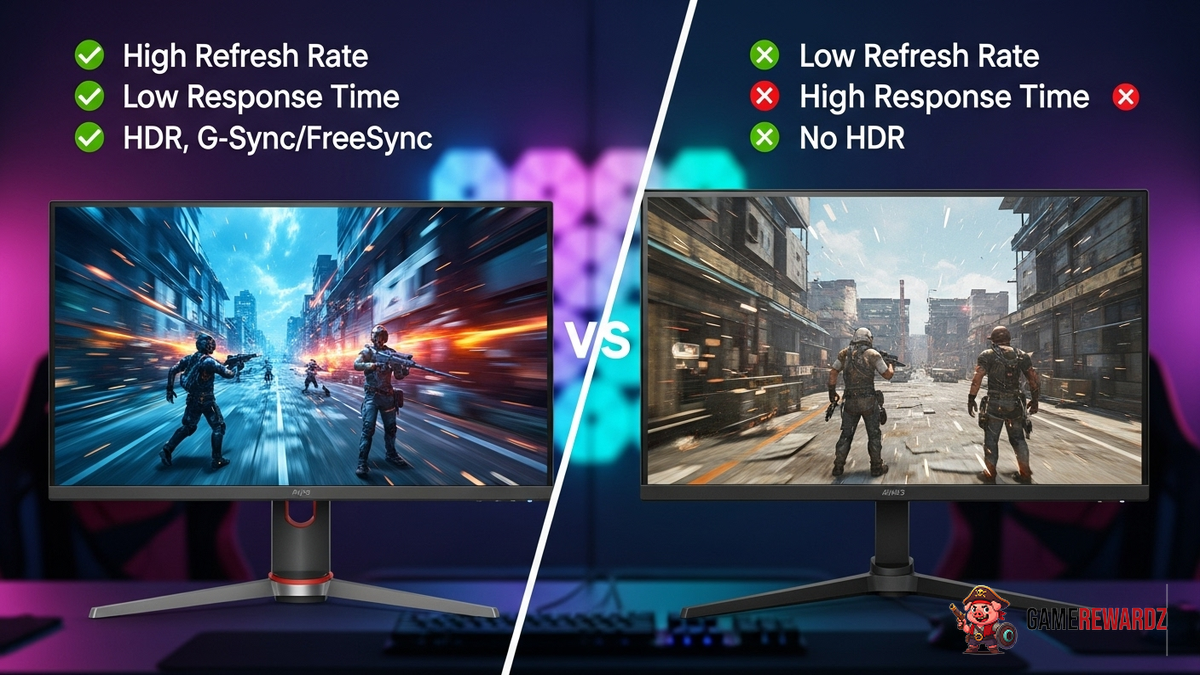
Alright, let's talk gaming monitors. Not just any monitors, mind you, but the best gaming monitor for you. It's a quest, a journey, a pixel-perfect pilgrimage, if you will. I remember my first gaming monitor; it was like peering through a keyhole into another dimension. Colors bled, ghosting was a constant companion... but hey, it was progress! Now, we've got curved screens, lightning-fast refresh rates, and enough jargon to make your head spin. Don't worry, I'm here to cut through the noise and help you find your perfect match.
Resolution Revelation: Seeing the Big Picture
First, let's tackle resolution. You've probably heard of 1080p, 1440p (often called QHD), and 4K. Think of it like this: resolution is the number of tiny dots (pixels) that make up the image on your screen. More pixels equals a sharper, more detailed picture. Sounds simple, right? Well, here's the thing: resolution and screen size are intertwined like a twisted headphone cable. A 1080p image on a massive 32-inch screen can look blurry, while it looks crisp on a 24-inch screen. And, if you are intrested in playing games, here is the best games to play.
So, what's the sweet spot? For most gamers, I'd recommend 1440p as the current gold standard. It offers a significant upgrade in clarity over 1080p without requiring a super-powerful (and expensive) graphics card to run smoothly. But—and this is a big but—if you're rocking a top-of-the-line GPU, then 4K can be glorious. Just be prepared to potentially dial back some graphics settings in demanding games to maintain a playable frame rate. And speaking of frame rates, that neatly brings me to...
Refresh Rate Rampage: Smoothness is King
Refresh rate, measured in Hertz (Hz), is how many times per second your monitor updates the image. A 60Hz monitor updates 60 times a second, a 144Hz monitor updates 144 times a second, and so on. The higher the refresh rate, the smoother the motion appears on your screen, especially in fast-paced games. This is where things get interesting. See, the human eye can perceive a difference up to a certain point. Most people can easily tell the difference between 60Hz and 144Hz, but the jump from 144Hz to 240Hz is less noticeable for some (though still beneficial, especially in competitive games). I remember when I first upgraded to a 144Hz monitor. It was like night and day. Everything felt more responsive, more fluid. My K/D ratio in online shooters definitely saw a bump. It's one of those things you have to experience to truly appreciate. By the way, if you are interested in BGMI skins, you can checkout here BGMI rarest vehicle skin. Then, there is response time, which complements refresh rate, response time is the time it takes for a pixel to change colors. You should aim for the lowest response time possible, ideally 1ms or less, to minimize ghosting and blurriness.
So, where does this leave us? Well, if you're serious about gaming, a 144Hz or higher monitor is pretty much mandatory. If you're on a budget, a 144Hz 1080p monitor is a great starting point. If you can afford it, a 144Hz or 165Hz 1440p monitor is the sweet spot for most gamers. And if you're chasing the ultimate in smoothness, and have the hardware to drive it, 240Hz or even 360Hz monitors are available.
Panel Technology: IPS vs. VA vs. TN – The Great Debate
Now, let's dive into panel technology. IPS (In-Plane Switching), VA (Vertical Alignment), and TN (Twisted Nematic) are the three main types of LCD panels used in gaming monitors. Each has its own strengths and weaknesses.
TN panels are generally the fastest, with the lowest response times and highest refresh rates. They're also typically the cheapest. However, they tend to have the worst color accuracy and viewing angles. Colors can look washed out, and the image can shift depending on your viewing position. Years ago, TN panels were the go-to choice for competitive gamers who prioritized speed above all else. But honestly, I think they're becoming less relevant as IPS and VA technologies improve.
VA panels offer a good balance between speed, color accuracy, and contrast. They typically have better contrast ratios than IPS panels, which means deeper blacks and more vibrant colors. However, they can suffer from slower response times than TN panels, which can lead to some smearing or ghosting in fast-paced games. VA panels are a solid all-around choice for gamers who want good image quality and decent performance. Also, check out the best sensitivity settings for PUBG Mobile here.
IPS panels are known for their excellent color accuracy and wide viewing angles. This means that colors look vibrant and consistent, even when viewed from different angles. However, they typically have slower response times than TN panels and lower contrast ratios than VA panels. IPS panels are a great choice for gamers who value image quality and color accuracy, especially if they also do creative work like photo or video editing. I've got to admit, this part fascinates me. The way these different technologies balance competing priorities. You might be wondering, what is the best panel for me?
Ultimately, the best panel technology for you depends on your priorities and budget. If you're a hardcore competitive gamer who needs the absolute fastest response times, a TN panel might still be an option (though I'd still recommend considering a fast IPS panel). If you want the best possible image quality and color accuracy, an IPS panel is the way to go. And if you want a good balance between speed, color accuracy, and contrast, a VA panel is a solid choice.
Adaptive Sync: Taming the Tears
Adaptive sync technologies like AMD FreeSync and NVIDIA G-Sync help to eliminate screen tearing and stuttering by synchronizing the refresh rate of your monitor with the frame rate of your graphics card. Screen tearing occurs when your monitor displays parts of multiple frames at the same time, resulting in a jagged, torn-looking image. Stuttering occurs when your frame rate fluctuates, causing the image to appear jerky and uneven.
FreeSync and G-Sync work by dynamically adjusting the refresh rate of your monitor to match the frame rate of your graphics card. This ensures that your monitor is always displaying a complete frame, eliminating screen tearing and stuttering. G-Sync typically requires a dedicated NVIDIA G-Sync module in the monitor, which adds to the cost. FreeSync, on the other hand, is an open standard that is supported by many monitors and graphics cards.
Here's the thing: Adaptive sync is a game-changer. Once you've experienced tear-free, stutter-free gaming, it's hard to go back. If you're buying a new gaming monitor, make sure it supports either FreeSync or G-Sync (or both!).
FAQ: Your Burning Monitor Questions Answered
How do I know if my graphics card can handle a high-resolution monitor?
That's a crucial question! Check the recommended system requirements for the games you play. They'll usually specify the graphics card needed for different resolutions. If you're unsure, search online for benchmarks of your graphics card running specific games at your desired resolution. Also, consider the monitor size. As a rule of thumb, bigger displays need more powerful GPUs.
What's the difference between "response time" and "input lag"?
Response time refers to how quickly a pixel can change color, while input lag is the delay between your action (e.g., moving the mouse) and the action appearing on screen. Both are important, but input lag is often more noticeable. Look for monitors with low input lag, especially if you play competitive games.
Is a curved monitor worth it for gaming?
Curved monitors can provide a more immersive gaming experience, especially on ultrawide displays. The curvature wraps around your field of view, making you feel more like you're inside the game. However, they're not for everyone. Some people find them distracting, and they can be more expensive than flat monitors. It really comes down to personal preference. I initially thought curved monitors were a gimmick, but after trying one, I was surprised how much I liked it! I keep coming back to this point because it's crucial.
How do I choose the right size gaming monitor?
Size matters! A 24-27 inch monitor is great for 1080p or 1440p gaming, while a 27-32 inch monitor is better suited for 1440p or 4K gaming. Ultrawide monitors can be even larger. Consider your desk space and viewing distance when making your decision. You don't want a monitor that's too big for your setup. Think about it this way... a large screen can be immersive. However, it can also be overwhelming if you're sitting too close.














![Peggle [FLASH] Game](https://gamerewardz.com/thumbs/peggle-flash-game_2.webp)








